pasteup / 07
Palette and finish
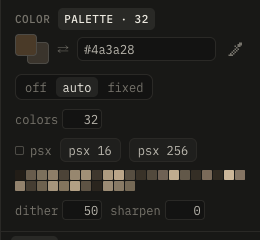
The finish is the last step over the color channel: sharpen, then ordered dither, then each texel to its nearest palette color. Layers stay as they are; the canvas, the 3D view, the export and Blender show the finished color.
The palette tab in the color panel:
| Setting | Effect |
|---|---|
| off, auto, fixed | no palette, one computed from the texture, or one of the project's |
| colors (auto) | how many: 2–256; the palette follows the texture once edits rest, and stays steady |
| palette list (fixed) | the project's palettes and the built-in quake, quake 2 |
| lospec… | a palette from lospec.com by its slug (as in lospec.com/palette-list/pico-8) |
| file… | a palette file: .lmp, .gpl, .hex, or the colors of an image |
| swatches | click: primary color, right-click: secondary, to paint in the palette |
| dither | 4×4 Bayer before the palette, so gradients break into patterns |
| psx | the PS1's 15-bit color (32 steps a channel), after the palette too |
| psx 16, psx 256 | the PS1's texture look in one go: auto with 16 or 256 colors, 15-bit |
| sharpen | crisper edges before the palette |
Palettes and the finish are saved with the project.
The PS1 has no fixed palette: a texture has 15-bit color, or a table of 16 or 256 colors (4 or 8 bit) that are 15-bit themselves; psx with auto 16 or 256 is that.