texxer / 08
Projects and export
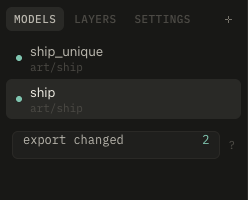
A project is a .texxer file anywhere. It lists models; each has its own texture, layers and variants. Painted masks sit in a folder beside the project.
- models tab: + adds GLBs, or drop them in. Double-click renames, × removes from the project (the files stay).
- ⌘P switches by name, PgUp PgDn steps through.
- The + on a model adds more GLBs that share its texture, like attachments. They are laid out side by side and painted together.
- The folder on a model picks where the export puts its PNGs, e.g. a shared
_texturesfolder. Cancelling puts them beside the files again.
Export
⌘E writes PNGs beside the model's GLB files or into its folder: <model>.png, emissive, _roughness and _ao for those channels (ao only when kept out of the color), variants, and on texxer's layout normal and occlusion maps. The GLBs are updated in place and link those PNGs instead of carrying a copy, so Godot and Blender use them directly.
The dot beside each model shows what it needs: dim when exported, teal when edited, not exported yet or its file changed (when Blender wrote it again), red when the file is missing. ⇧⌘E exports all models that need it.